Overview
Advanced Survey (launched as Aerial Pro) is DroneDeploy’s survey-grade add-on for earthworks and sitework. It bundles high-accuracy processing, accuracy alerts and a new set of earthworks tools (Locations, Grid View, Progress to Design and a History Timeline) into one product that answers the question every site team asks each week: how much dirt moved, where, and how far are we from design?
I was the lead product designer on the earthworks experience from first sketches in early 2025 through launch at DroneDeploy Horizons (Oct 2025) and the polish releases that followed. In 2026 I wrote the PRD for its next phase, the standalone Earthworks App, and built working prototypes for it.
| Role | Lead Product Designer: research, UX, UI, interaction specs, prototyping, Phase 2 PRD |
| Team | PM, EM, Aerial engineering team, Survey & Customer Success |
| Timeline | Jan 2025: discovery · Oct 2025: launch · Dec 2025: Grid View + Location Detail GA · Feb 2026: Q1 polish · Aug 2026 to now: Earthworks App |
| Platform | Web (Explore map), tablets used in the field |
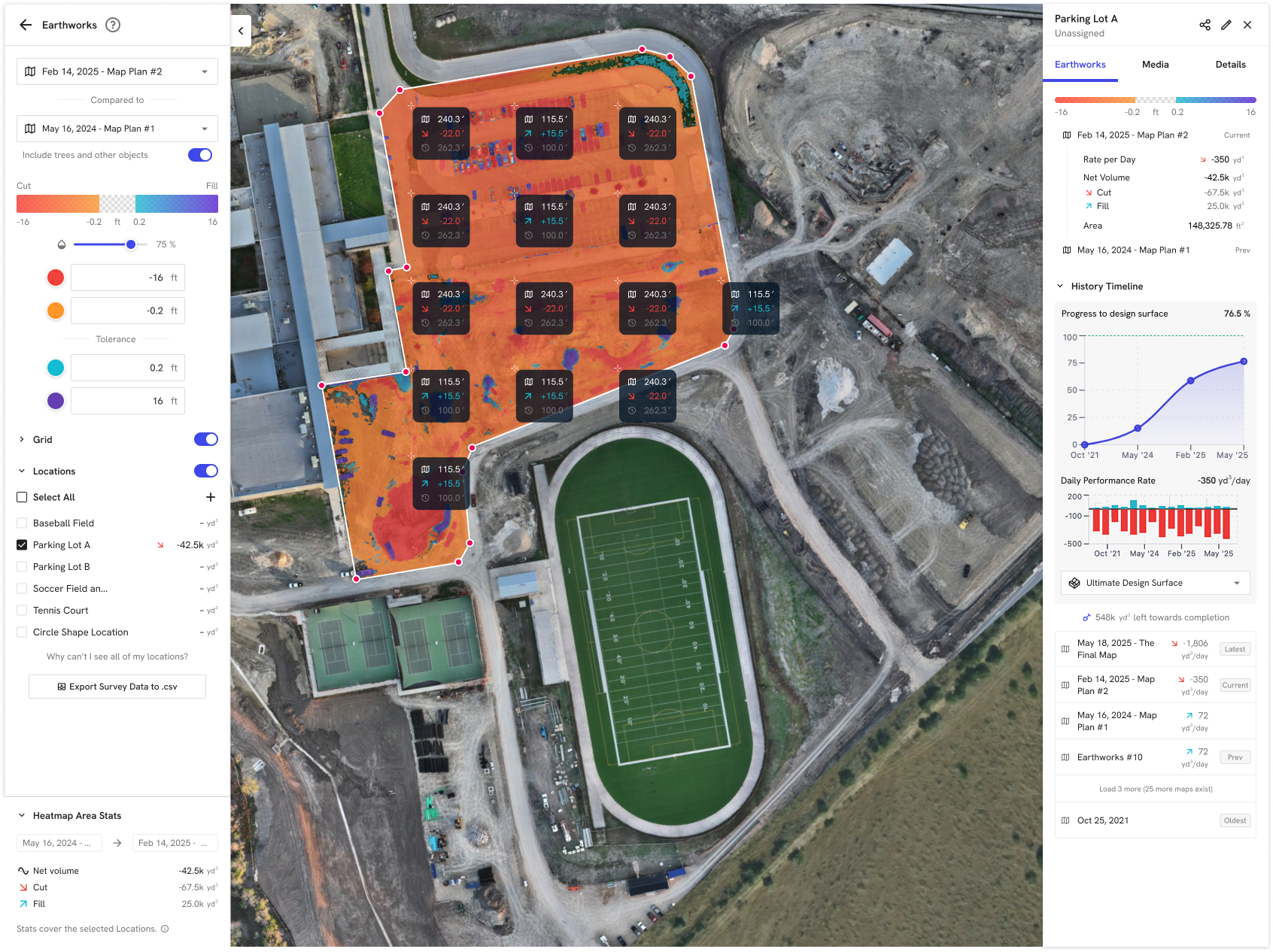
Cut/Fill with Locations, Grid View and the Location Detail sidebar
Discovery: why this mattered
Three signals came together in early 2025.
1. Customers were losing trust in their own maps. When we audited controlled maps across enterprise accounts, many flagship jobs regularly produced maps that failed our own accuracy checks. The causes were mundane: misused GCPs, mixed coordinate systems and no onboarding. More than 70% of those red flags could be fixed with better field workflows. As one internal deck put it, these customers were “silently failing.”
2. We were losing earthworks deals. In heavy civil and sitework, our main competitor won on one thing: it felt like a survey tool. We had already shipped strong accuracy features (Instant RTK, drag-and-drop PPK, project-level GCPs, terrain edit, ML DTMs, design overlays), but they were scattered across the product and in practice given away for free.
3. Cut/fill showed where, not how much. Our cut/fill heatmap showed where the ground changed but could not answer how much. Customers screenshotted it and rebuilt the numbers by hand.
In discovery calls with general contractors and survey crews, we watched people work around us:
- A VDC lead copied volume annotations from map to map, one by one, and assembled the numbers into a PDF report.
- A survey lead exported cut/fill to Excel every week, reformatted it for superintendents, and used it to hold subcontractors accountable.
- Others used hand-drawn or CAD grids with elevation labels, which is the visual sitework teams have trusted for decades.
That last pattern became the design anchor. A labeled grid is not a new idea. It is the industry’s own language, and our product didn’t speak it.
Problems to solve
- Accuracy is fragile and invisible. Users can’t tell whether a map is survey-grade before they share it.
- The heatmap shows change but not magnitude. “How much?” meant cross-referencing a histogram or hovering point by point.
- No per-area tracking. Sites are run by pads, lots and phases, but cut/fill was site-wide only.
- No progress or history. There was no answer to “Are we on grade yet?” or “What changed since the last controlled map?”
- Reporting happens outside the product. Teams moved to Excel, Bluebeam or AGTEK for anything they had to hand to an owner.
- Value wasn’t packaged. Powerful tools were hidden behind toggles, with no clear story and no SKU.
Jobs to be done
| When… | I want to… | So I can… |
|---|---|---|
| I fly a site | trust that the map is survey-grade without an expert on every job | use it for quantities and pay apps |
| I review a new map | scan a labeled grid of elevation change | spot highs, lows and wrong-area work at a glance |
| I manage pads, lots or phases | see cut, fill and net volume per location | report progress the way the site is actually run |
| the week ends | see progress to design and production rate over time | know if we’re on schedule and on grade |
| something looks off | spot-check a single point | settle a question in seconds, not hours |
| it’s time for a pay app or OAC meeting | hand over a defensible cut/fill record | stop rebuilding reports in other tools |
Primary personas: survey manager / grade checker, project and field engineer, superintendent, VDC manager, and the owner’s rep who receives the report.
What we heard
“I’m only one guy and we keep adding more and more jobs and flying more and more. I just can’t keep up. I want everyone to shoot for high accuracy. I think that should be the default.”
— Technology specialist, utility contractor
“I certainly don’t want to be the one doing it or training all of our project teams on how to do it.”
— Lead VDC drone pilot, general contractor
“I just kind of made my own Excel sheet and just drop in the data every week.”
— Survey lead, regional GC
“Can you export all the data for the cut fill for this location? So you can see the change over time just on one sheet.”
— Survey lead, regional GC
“We had another dirt sub send out a grid PDF to our job teams just to show a cut fill… It’s just a communication tool amongst the superintendents, to be honest with you, just on progress.”
— Field operations, regional GC
“The initial setup is so hard… GCP tagging is just a small part of what I think is the hard part.”
— Enterprise GC
Three insights shaped the design:
- Accuracy has to be the default, not a skill. The people flying aren’t surveyors, and the people who are surveyors can’t scale.
- Numbers beat colors. Superintendents read labeled grids and quantity tables, not gradients.
- The unit of work is a location over time. A single site-wide total doesn’t map to how earthworks is planned, paid or argued about.
Diverge: explorations
Packaging. The original plan was two products: Managed Accuracy in Q2 and Earthworks AI in Q4. In customer conversations it became clear they were one job: you can’t trust earthwork quantities from an uncontrolled map. We merged them into a single add-on. We also considered and rejected a broader bundle that included unrelated hardware workflows, to keep the story survey-focused.
Cut/fill controls. I redesigned the color bar so users could tune it with confidence. Edge values became input boxes. A handle slider controls tolerance only. The tolerance band keeps a minimum width so the center stays controllable. The four inputs mirror each other, so entering −16 ft fills in +16 ft. I specified every state as a decision tree so engineering didn’t have to guess.
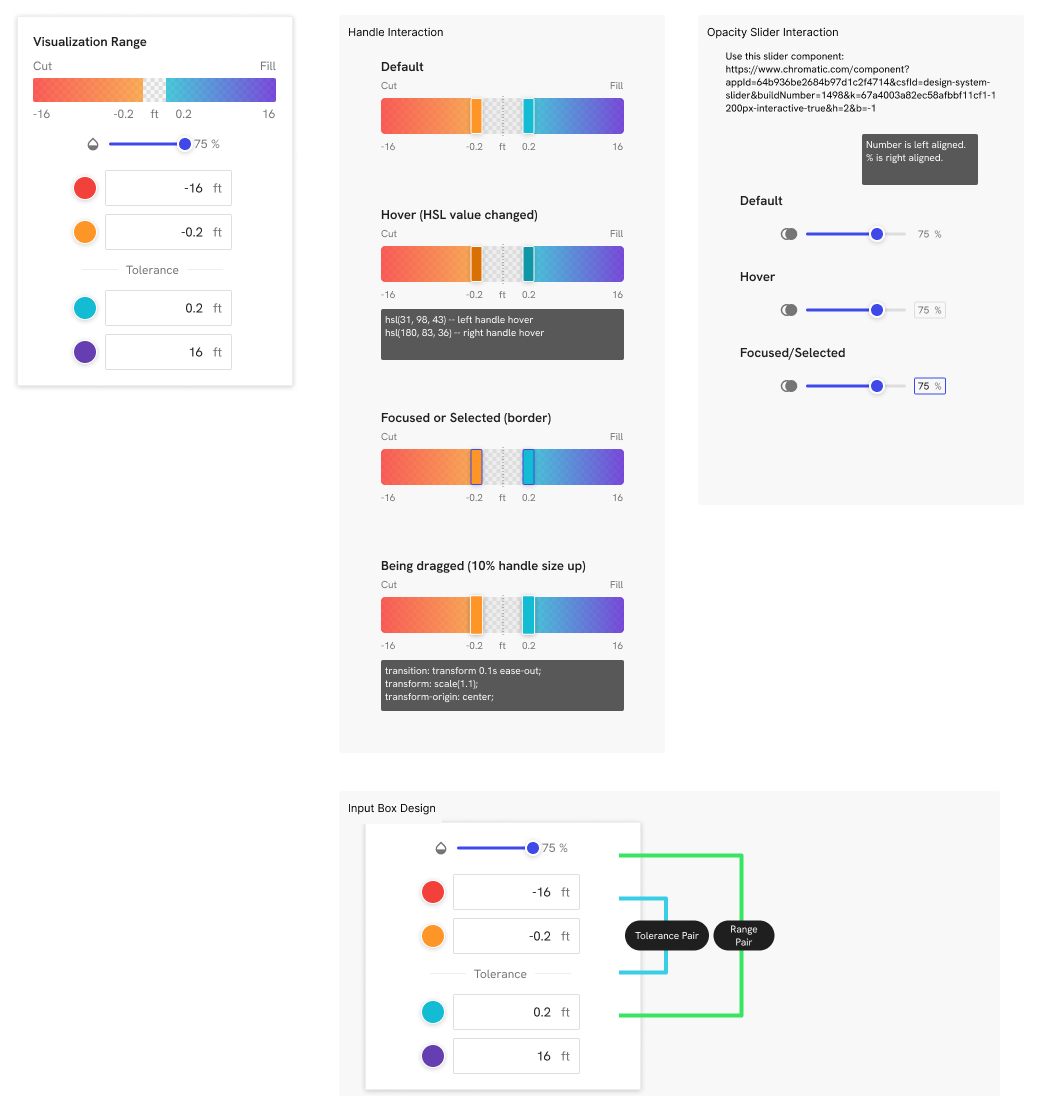
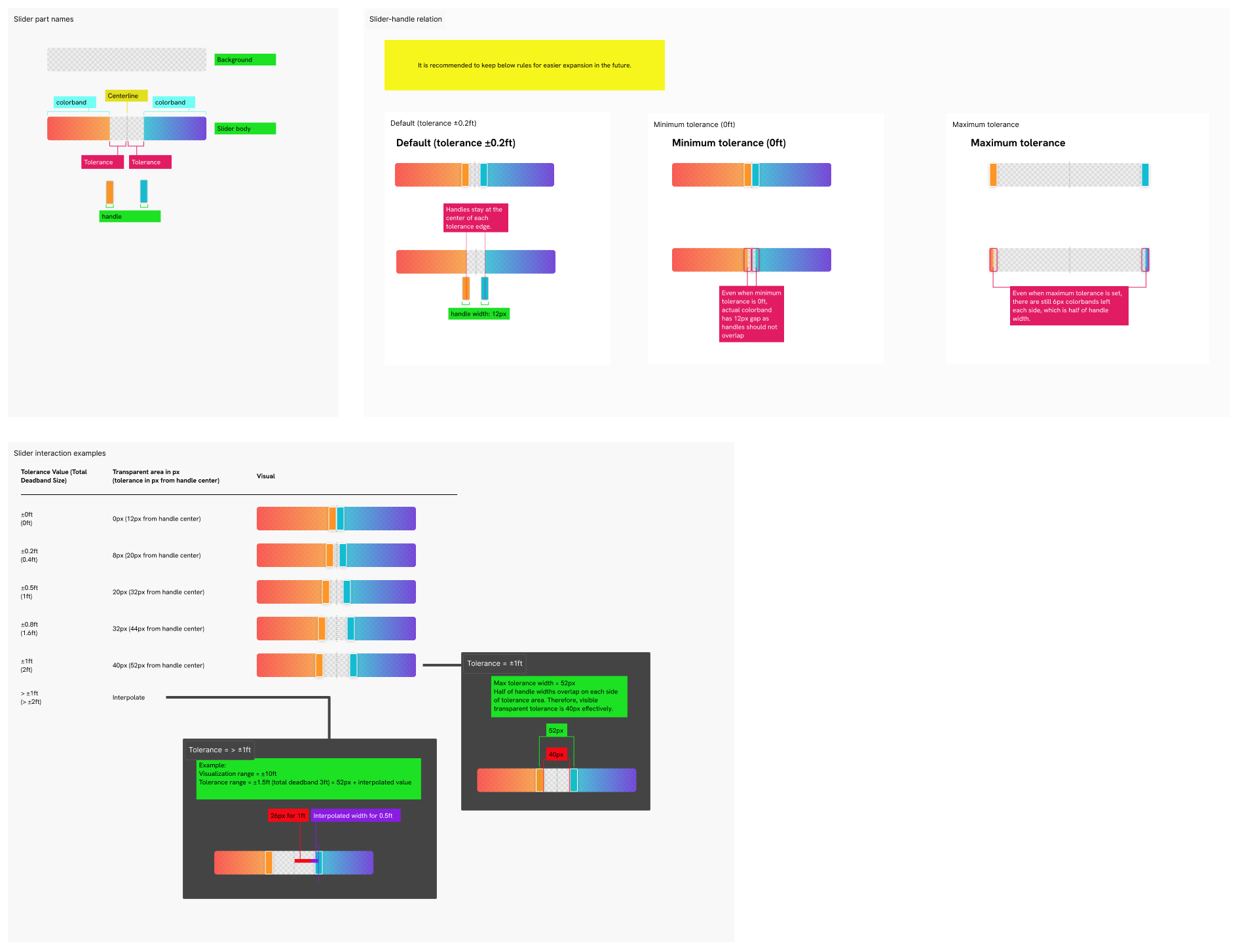
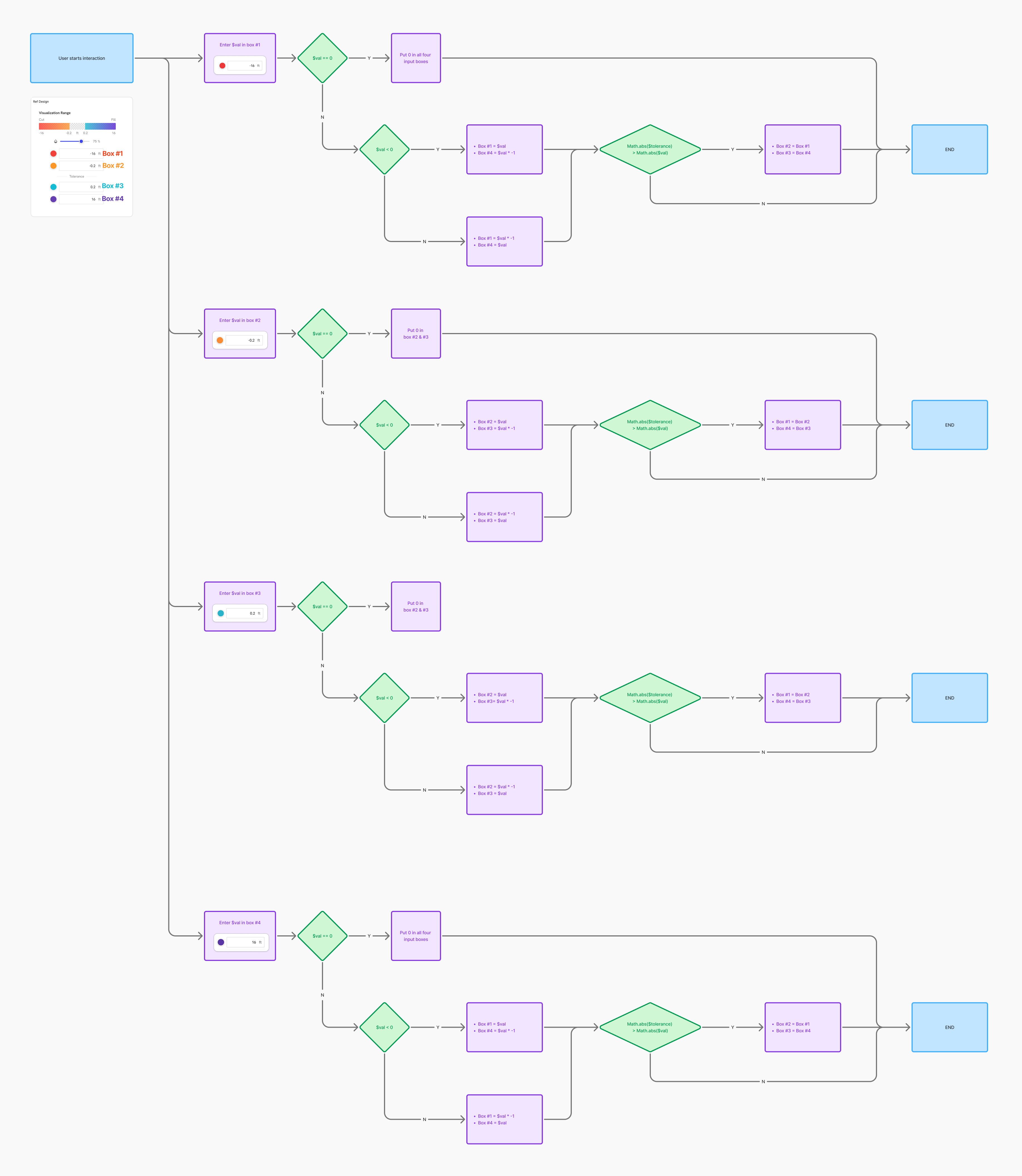
Color bar: handle states, tolerance rules and mirrored input logic
Grid cell design. Each grid cell has to answer four questions in a glance: which map is newer, which surface is higher, is it a design comparison, and is it cut or fill? I explored chip layouts where time reads left to right and values stack by actual elevation. I compared variants with a quick legibility “quiz”: can you answer all four from the chip alone?
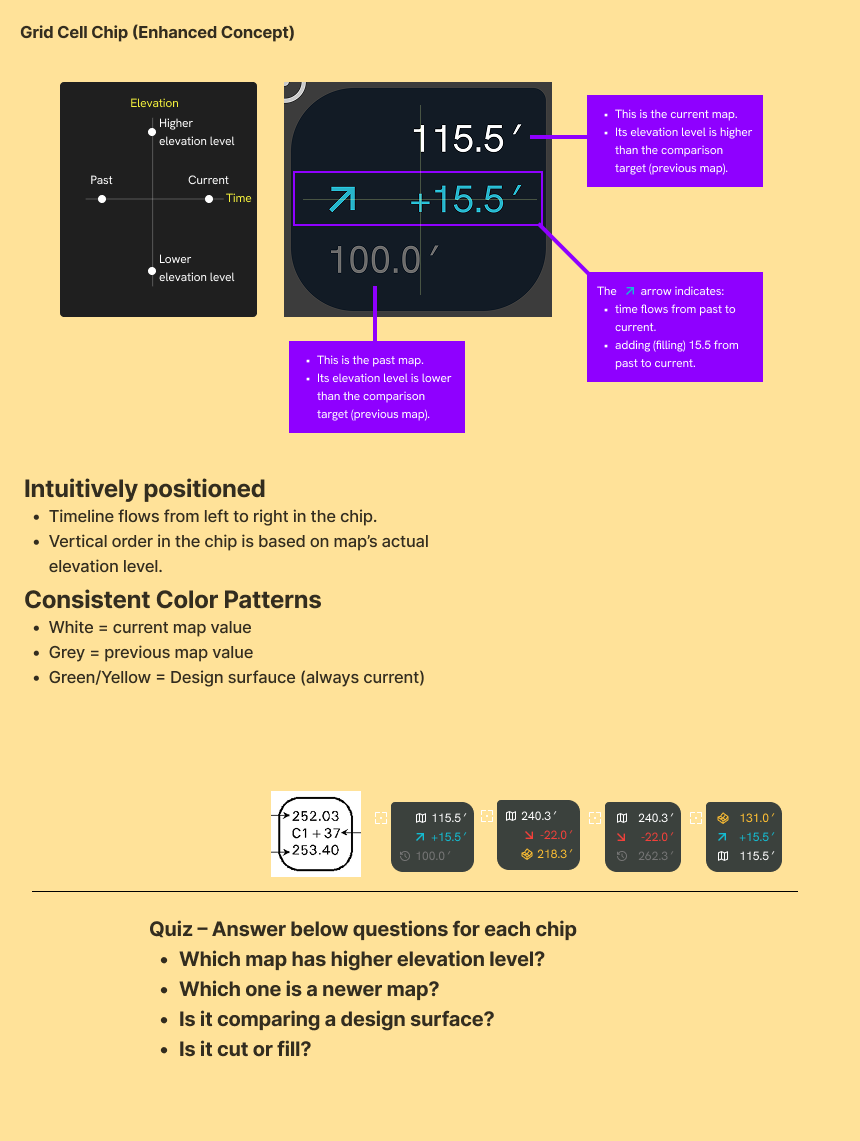
Grid cell chip concept and the quiz used to test it
Labels across zoom levels. A site can have hundreds of cells and dozens of locations, so labels had to degrade gracefully. They go from full cells, to compact cells, to directional mini-arrows, to hidden. Location labels follow their own rules.
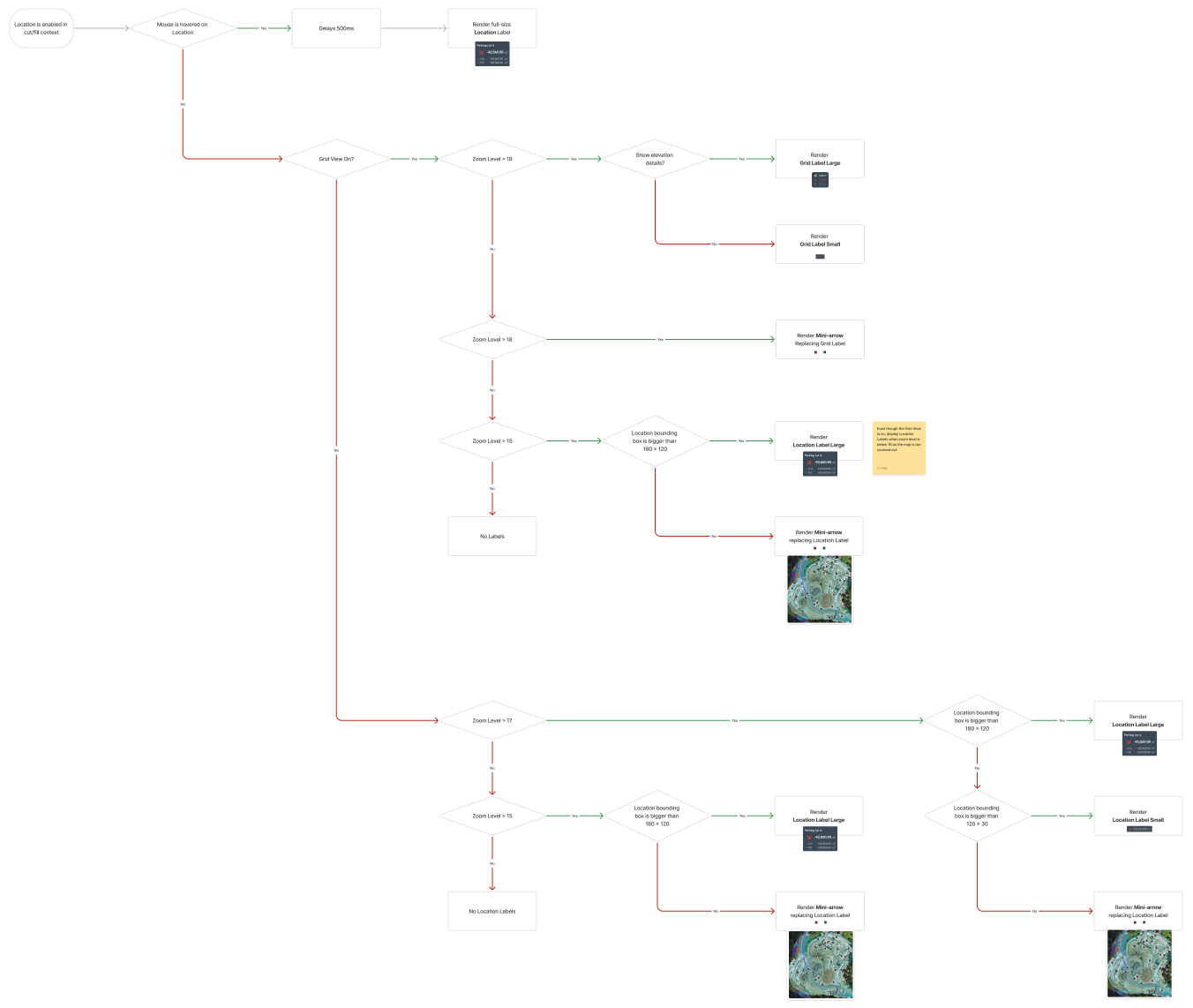
Label sizing logic for grid cells and location labels
Location detail sidebar. I explored how much analysis fits in a sidebar: a progress bar alone, a progress curve, a daily performance-rate chart, or both overlaid. I chose the progress curve plus the rate chart, with a scrollable list of historical maps. Separate cut-versus-fill progress was deferred.
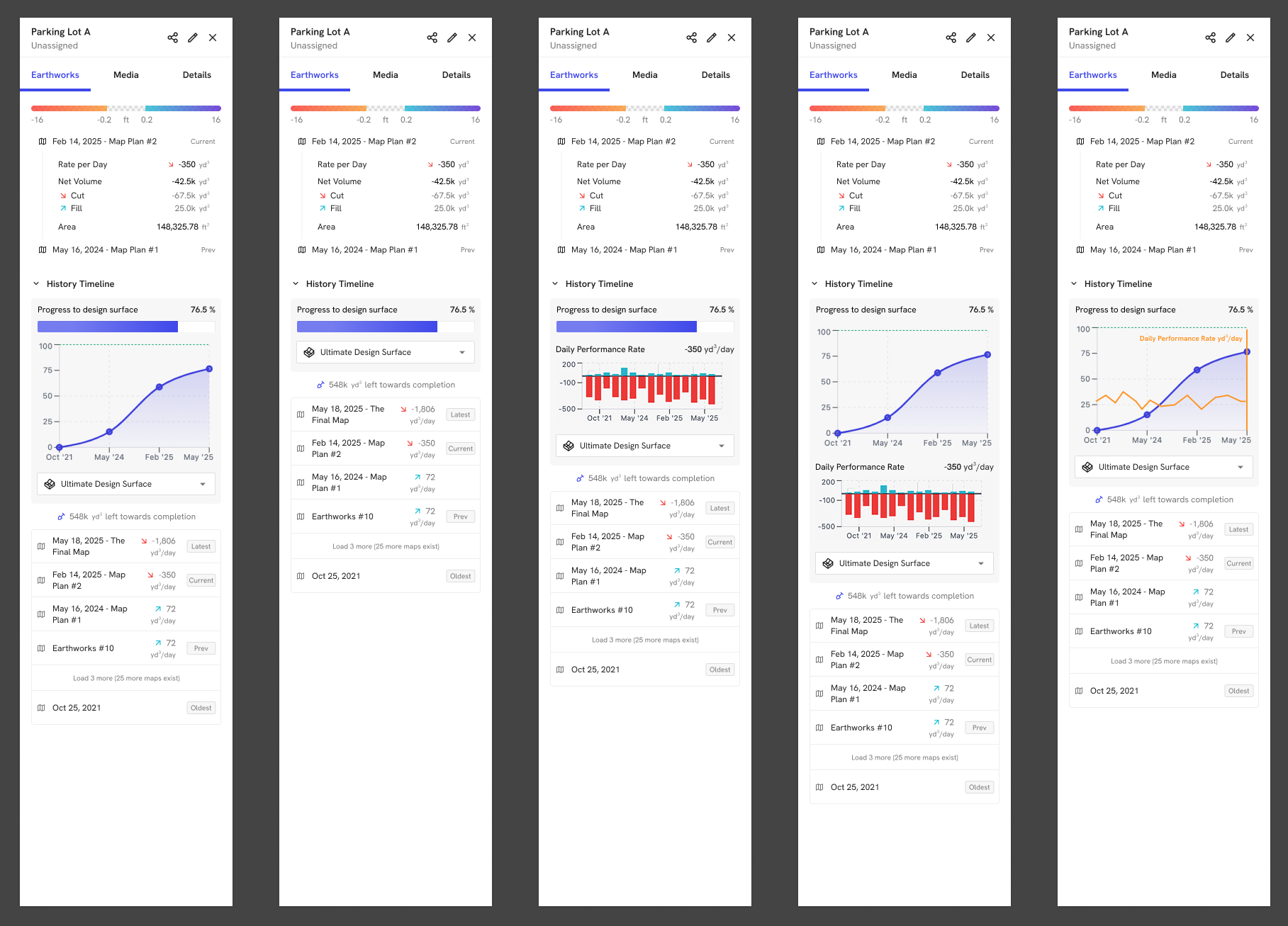
Location detail sidebar: progress and history variations
Other directions we considered:
- Custom grids from survey points. Field teams asked to import their own CAD point grids. We parked this for later in favor of a normalized grid that works on any site.
- Hover-only details. I rejected these after seeing field teams run DroneDeploy on touchscreen kiosks and tablets. My rule became: anything shown on hover must also be reachable by tap. Hover is for preview only.
- Overshoot as 100%. Should progress past design read as “complete”? I argued that overshoot is a form of incomplete, not done. We capped the bar and exposed the overrun in the tooltip and the CSV.
Converge: the solution
Advanced Survey shipped as one add-on that flows from capture → control → measure → report:
- High-accuracy processing and accuracy alerts. Controlled-map filters and warning states tell you whether a map is safe to use before anyone measures it.
- Cut/Fill, redesigned. Map-to-map or map-to-design comparison with a precise, tolerance-aware color bar.
- Grid View. A uniform grid with labeled elevation change per cell, configurable spacing, and an option to show both surface elevations.
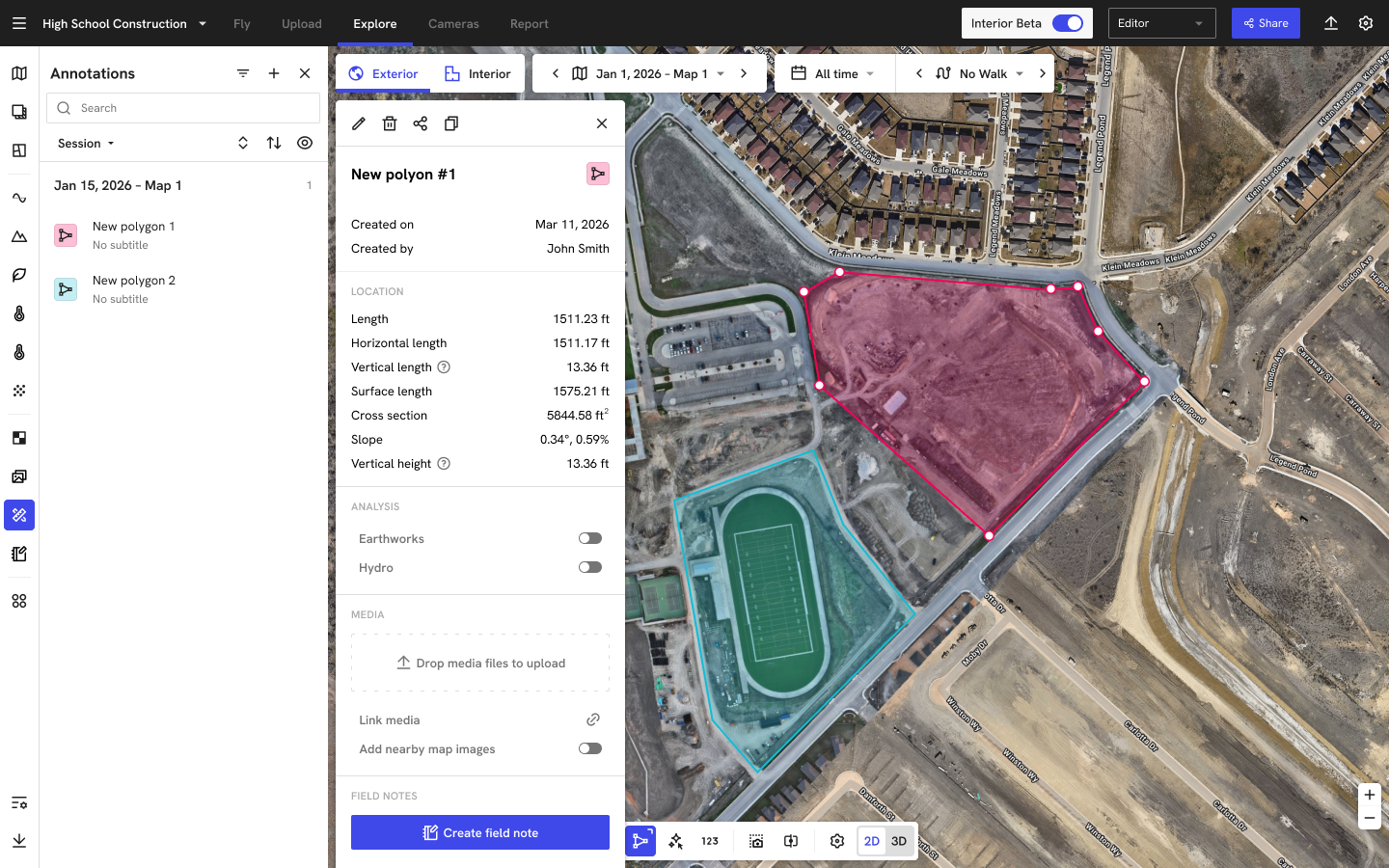
- Locations. Named areas (pads, lots, phases) with cut, fill and net volume each, plus CSV export.
- Location detail sidebar. Progress to the design surface, a history timeline across every controlled map, and a daily production rate (yd³/day). A Volume/Rate toggle was added in Q1 2026.
- Graceful states. These cover uncontrolled maps (greyed out, N/A), a missing design surface, DSM vs DTM comparisons, and “zoom in to see labels.”
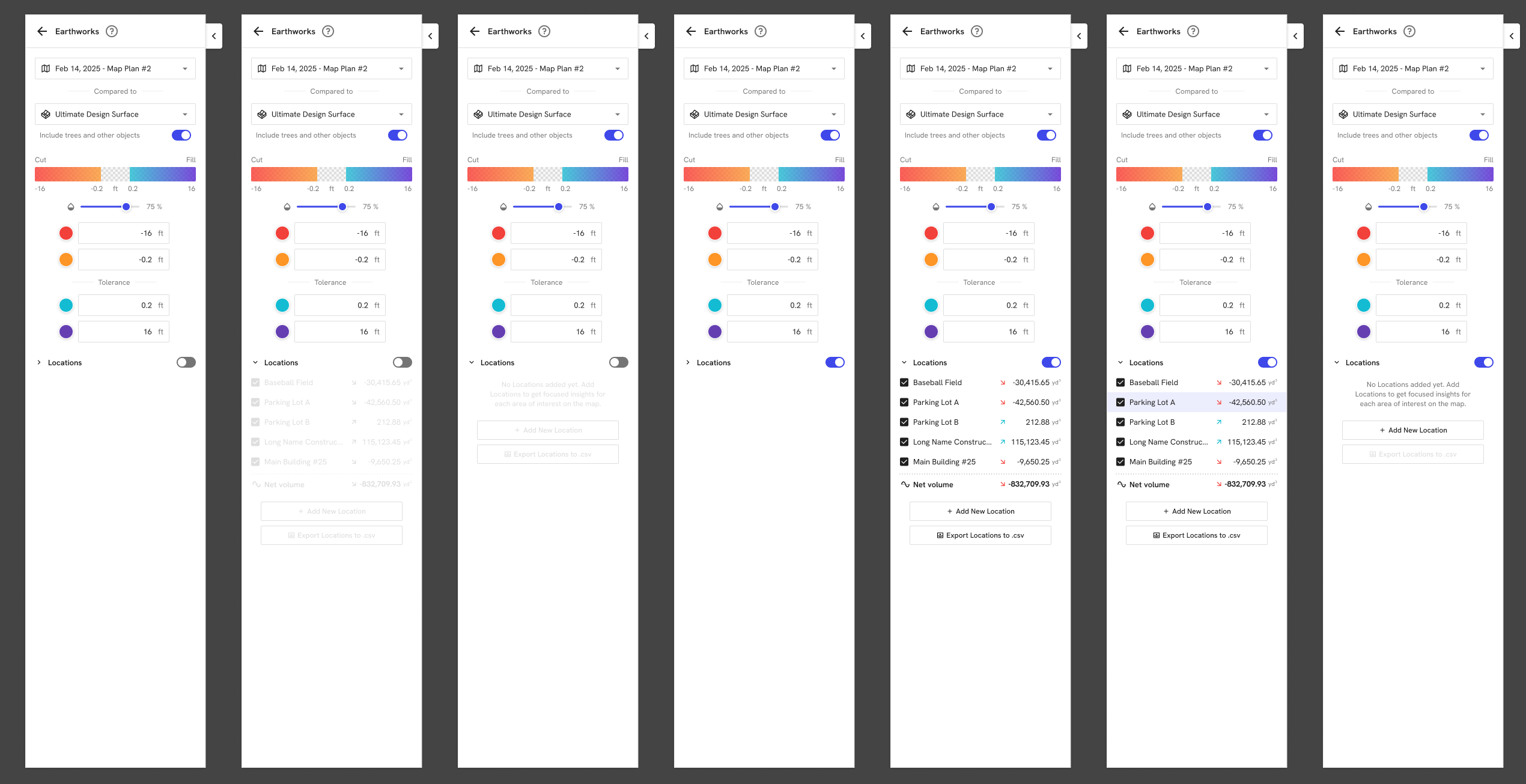
Earthworks panel states: Locations off, empty, loading, populated and selected
Major challenges in delivery
Rendering hundreds of labels on a map. The first build used HTML markers, which slowed the map. Engineering moved to a map symbol layer, which meant every label had to be an SVG. I redrew the cells as three SVG sizes, plus mini arrows and a zero-value icon, because icon fonts couldn’t be used there.
Zoom rules that broke on big sites. The first release showed grid labels only at fixed zoom levels. On a large site with wide spacing, users had to zoom in so far that they lost the context of the map. I re-derived the rule from pixels instead of zoom: a readable cell needs about 100 px, and with some label crowding allowed it can go down to about 80 px. We shipped 88 px for full cells and 25 px for arrows, and raised grid spacing to 350 ft / 100 m.
Trust edge cases. Comparing against uncontrolled maps, DSM vs DTM, and design surfaces that only exist as DSM could all produce numbers that look right but are wrong. Every one of them needed an explicit state, label or warning rather than a silent value.
Slow history queries. Loading volumes for every map at every location is expensive. The timeline loads the five most recent maps first and the rest on demand, with honest loading states.
Scope versus launch date. The launch moved from September to Horizons (late October). To protect the core loop, we cut a Cut/Fill/Both toggle, separate cut and fill progress, and progress fields in the CSV, and shipped them in later polish releases.
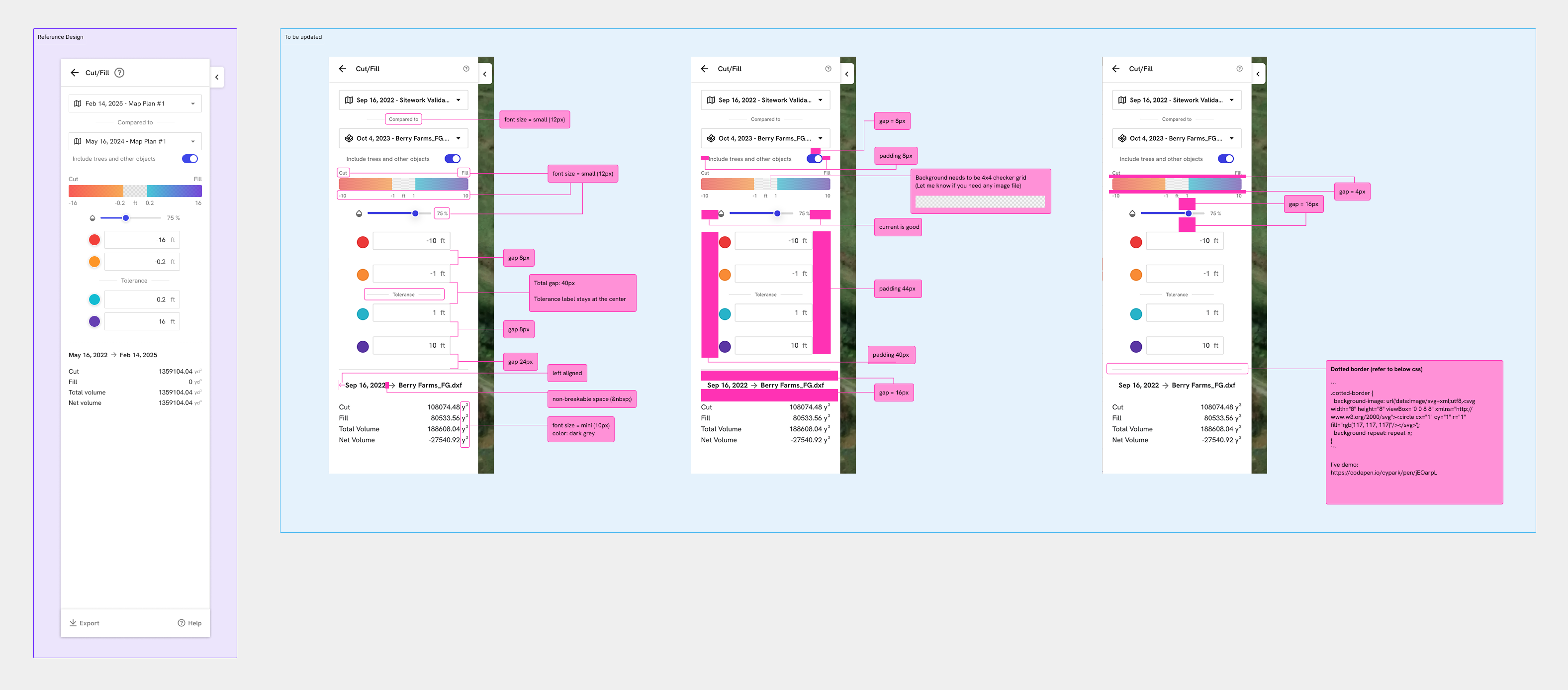
Implementation review: reference design vs build, with redlines
Results
- Competitive win rate rose from ~35% to ~50% against our main earthworks competitor between Q2 and Q4 2025. The first Aerial Pro deal was a competitive take-out.
- Accuracy improved where the product was used. In beta, the share of projects with red-flagged maps dropped from 35% to 14%.
- Cut/Fill comparison usage tripled. Monthly users went from 202 at relaunch (Jul 2025) to 514 (Mar 2026) and peaked at 610 (Jul 2026), across roughly 300+ organizations each month.
- Grid View became a habit. After launch it held steady at 80–90 monthly users across about 45–50 organizations, with 440+ unique users to date. That is steady weekly use, not a one-off spike.
- Reporting moved into the product. A national GC’s VDC regional manager: “We’ve been using locations a lot in the last month to itemize and automate our cut/fill reporting and they’ve been working really well.” A paving contractor now uses grid views for monthly pay draws.
- A clear story for sales. Account teams stopped pitching a grab bag of toggles and started selling one survey-grade product.
What I led and contributed
Led
- End-to-end UX and UI for Advanced Earthworks: the color bar and tolerance controls, Grid View, Locations, the Location detail sidebar (progress, history, rate), and all empty, loading, error and uncontrolled states.
- Interaction specs as decision trees and redlines for engineering: input-box logic, slider rules and label sizing across zoom levels, plus production SVG assets.
- The pixel-based zoom rule that fixed Grid View on large sites.
- The touch-first principle (no hover-only actions) adopted across cut/fill.
- Phase 2: I authored the Earthworks App PRD and prototype tech spec, built two working code prototypes, and ran feedback sessions with our survey crew and customers.
Contributed
- Discovery calls with GCs and survey crews, and a planned moderated study on grid cell design and spacing units.
- Packaging and provisioning: UI for turning Aerial Pro on per organization or per project, and upsell entry points.
- Accuracy alert warning states, and the point-based cut/fill flow (“Grid View, but with one cell you can place anywhere”).
Phase 2: the Earthworks App
Advanced Survey proved the demand and exposed the limits. Earthworks still lived as a layer inside a general-purpose map viewer: buried, hard to configure, and not ready to report on. Earthworks was also one of the largest themes in customer feedback, with dozens of requests from about 35 customers, most of them asking for a report they could hand to an owner.
“Instead of having to do all this in DroneDeploy, and then export it out and do it in AGTEK to get this report, being able to do it all in DroneDeploy and print it out would be useful and helpful for us.”
— Heavy civil contractor
I wrote the PRD for a standalone Earthworks App and prototyped it in code with AI tools. In about 20 hours I had a working build at roughly 70% parity, which let us test with real data instead of mockups. I explored two directions:
- Report-centered. Start from one isolated report and build the analysis around it.
- Multi-view. A project holds several saved views that can be compared without overwriting each other.
I showed both in survey-crew huddles and to customers. Their feedback shaped the plan:
- Send on events, not schedules. “After every flight,” because weekly emails “clog inboxes.”
- Print at plan-set sizes. “At least an 11 by 17… that’s where I’d want.” Some also asked for ARCH D.
- The screen is the layout. No layout editor. What you configure is what prints.
Where it stands (Oct 2026):
- Parity release. Earthworks moves into its own app with nothing added or dropped. It is in internal testing.
- Earthworks Export. A print-ready map sheet at true scale with a key plan, a Letter quantities report, and a CSV, with an option to auto-send after every new map.
- Next: point and section spot-checks, stationing, tolerance alerts, separated cut/fill/haul-off quantities, and compaction and swell.
- Later: hydrology (water-flow analysis has decided deals), machine-control data, and sending quantities straight into pay-app workflows.
Success measures: at least 30% of active Earthworks sites exporting monthly, at least 15% using auto-send, customers retiring their AGTEK and Bluebeam workarounds, and a win rate of at least 55% against our main competitor.
Reflection
- Speak the customer’s visual language first. The grid was the most “obvious” feature, and it is the one people use every week.
- Design the states, not just the screen. Most of the trust work lived in edge cases: uncontrolled maps, mismatched surfaces, zoom limits.
- Prototype in code when the risk is in the data. Building Phase 2 against real sites got sharper feedback in weeks than static mockups had in months.